Exposing Darkmegi an Infrastructure Map Service to Find and Remove a Kernel Rootkit
Malicious kernel‑level malware like Darkmegi is one of the highest‑risk threats an enterprise can face: stealthy persistence, ability to tamper with security controls, and the power to hide lateral movement.
Malicious kernel‑level malware like Darkmegi is one of the highest‑risk threats an enterprise can face: stealthy persistence, ability to tamper with security controls, and the power to hide lateral movement. Our Exposing Darkmegi service is a focused engagement that builds a clear infrastructure map of the infection, discovers Indicators of Compromise (IOCs) across your estate, and delivers prioritized containment and remediation steps so you can remove the threat with confidence.
Below we present the service as a clear infrastructure map (conceptual, without naming any specific mapping products), the deliverables you’ll get, and a practical table of the IOCs you asked us to raise awareness about so SOC and IR teams can block and hunt.
Service overview how we map and remediate Darkmegi infections
We run a phased, evidence‑based service designed for speed and safety:
1. Rapid reconnaissance (non‑disruptive)
Collect endpoint metadata (file inventory, driver listings, scheduled tasks, running services, boot artifacts) and centralized logs (EDR, SIEM, network logs).
Capture volatile data (kernel objects, loaded drivers, active handles) without modifying disk where possible.
2. Infrastructure mapping (visual attack surface map)
Build a relationship graph showing: infected endpoints, suspicious drivers and system files, associated accounts and services, lateral connections, and C2 network endpoints (if present).
Highlight persistence primitives (signed/unsigned drivers, unsigned kernel modules, suspicious boot items, scheduled or automated scripts).
3. IOC correlation & triage
Correlate collected telemetry with known IOCs and host behaviours to prioritize hosts with confirmed compromise versus probable/possible exposure.
4. Containment & targeted mitigation
Isolate confirmed hosts from the network, block identified file hashes and paths in endpoint controls, and stop malicious kernel modules safely to prevent further stealthy control.
5. Forensic eradication & hardening
Remove malicious drivers and artifacts, rebuild or reimage where rootkit modifications are irretrievable, and apply configuration changes to prevent re‑infection (secure driver signing, restrict driver install privileges, tighten service and account permissions).
6. Hunt, monitor & verify
Continuous scanning for the delivered IOCs, scheduled re‑checks, and verification of the eradication through independent telemetry.
7. Deliverables
Interactive infrastructure map of the infection (graph and timeline).
IOC block list formatted for your EDR/SIEM/NGFW and change control procedures.
Remediation playbook with step‑by‑step safe actions per host.
Post‑engagement report with root cause, artifacts captured, and recommended long‑term mitigations.
Why map the infrastructure?
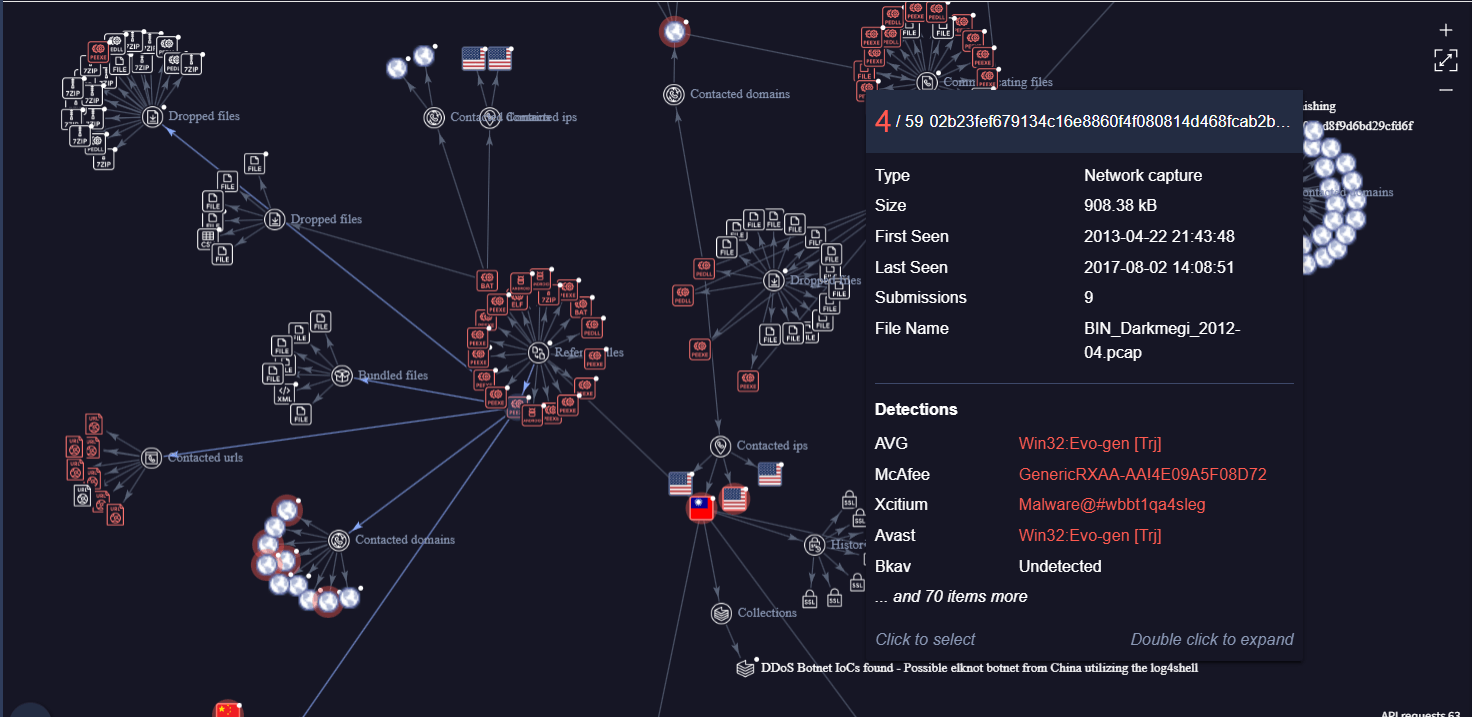
A list of infected hosts is useful, but a map shows relationships how a suspicious driver on Host A led to persistence on Host B, which server provided a staging binary, and what accounts or service misconfigurations allowed lateral move. That context is essential to ensure you don’t simply remove artifacts and miss the root cause (and a second wave).
Practical IOC table block & hunt immediately
Below is a table of the IOCs you provided. We present each entry with a recommended immediate action for SOC/IR teams. These are worded so they may be translated directly into control rules in endpoint protection or SIEM playbooks.
| IOC Type | Value | Context / Size (bytes) | MD5 |
|---|---|---|---|
| File hash | 6C8F9658A390C24A9F4551DC15063927 | , | 6C8F9658A390C24A9F4551DC15063927 |
| File path (driver) | C:\Windows\System32\drivers\com32.sys | 9728 | 4399b8a60977814197feae67c02a7ac2 |
| File path (driver) | C:\Windows\System32\drivers\com32.sys | 26224256 | dd313b92f60bb66d3d613bc49c1ef35e |
| File path (temp) | C:\Windows\System32\drivers\RCX50E3.tmp | 26224256 | 9f32c51764f579512810b7ab3de1a91a |
| File path (DLL) | C:\Windows\System32\com32.dl | 45056 | 25cfb72df8a30cbb7e6ee852bc31c50f |
| File path (temp) | C:\Windows\System32\RCX5B11.tmp | 31506432 | 2f00e0927c07bc44d9b79ccbe567f398 |
| Script / Batch file | C:\Windows\System32\del043.bat | 86 | 1a1e7855edc0afa6624080d60da8bf44 |
Note: All hashes above are MD5 values as supplied. Where a path appears multiple times with different hashes, that strongly suggests on‑disk replacement or polymorphism. Treat such hosts as escalating priority.
Practical, safe hunting & blocking recommendations (no destructive steps included)
Block by hash and path: In your EDR/AV, add the MD5 hashes above to immediate block/quarantine rules. For file paths inside C:\Windows\System32 that are not part of your approved baseline, create alerts and auto‑quarantine policies.
Detect suspicious driver loads: Alert on unsigned kernel driver loads, drivers with unusual file sizes, or drivers loaded outside approved maintenance windows.
Monitor creation events: Create SIEM rules to alert on process creates that write into C:\Windows\System32\drivers\ or create .tmp driver files there.
Protect boot and driver install paths: Enforce driver signing policies (Block unsigned drivers), restrict driver-install privileges to a limited admin role, and use code integrity policies where possible.
Capture forensic evidence: When an IOC triggers, capture memory and kernel module listings before remediation so you can verify rootkit artifacts (avoid rebooting infected hosts until you’ve captured volatile evidence if safe to do so).
Harden host controls: Apply least privilege to service accounts, limit local admin use, and enforce secure update and patching processes, rootkits often leverage misconfigurations and unmonitored admin channels.
Apply network controls: Block and monitor suspicious outbound connections from infected hosts, and temporarily isolate hosts with confirmed IOCs.
How we help (engagement models)
- Emergency incident response 24/7 rapid team to contain, map, and eradicate Darkmegi artifacts.
- Threat hunting + mapping multi‑day engagement to build a complete infection graph and deliver SIEM/EDR rule sets.
- Remediation & validation removal, reimage orchestration, and post‑remediation verification scans.
Next steps
If you’d like, we can convert the IOC table above into formatted export files for your tools (CSV for SIEM, JSON for EDR ingestion) and produce the first‑look infrastructure map within 24–48 hours of approval starting with a prioritized list of hosts that have matched any of the above IOCs.
Want us to prepare the export files and a sample remediation playbook for the IOCs listed? We’ll take the IOCs, produce ready‑to‑upload CSV/JSON rulesets, and a one‑page containment checklist you can use immediately.